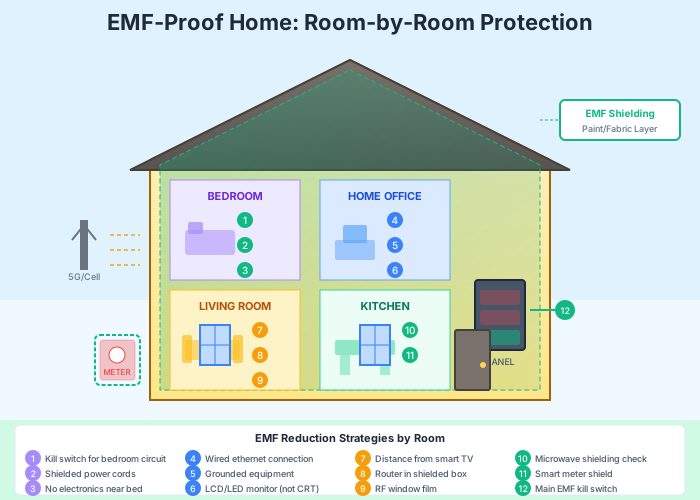
How to EMF-Proof Your Home: A Room-by-Room Guide
Quick Answer: EMF-proofing your home involves strategic device placement, hardwired alternatives to wireless technology, shielding materials for high-exposure areas, and creating low-EMF sleep sanctuaries. The most effective approach combines distance-based strategies with physical shielding and behavioral changes—starting with the bedroom where you spend one-third of your life.
Key Facts at a Glance
| Question | Answer |
|---|---|
| What’s the easiest first step? | Move your WiFi router away from bedrooms and living areas, ideally to a garage or basement |
| Do EMF kill switches work? | Yes—they cut power to bedroom circuits, eliminating electric field exposure during sleep |
| How far should devices be from your bed? | Minimum 6 feet for phones and tablets; ideally remove all wireless devices from the bedroom |
| Is shielding paint effective? | RF shielding paint can block 99%+ of radio frequencies when properly applied and grounded |
| What about smart meters? | Shielding covers can reduce RF emissions by 90-98% without affecting meter function |
| Are wired connections really better? | Yes—ethernet produces zero RF radiation compared to WiFi’s constant signal broadcast |
Electromagnetic fields permeate modern homes through WiFi routers, smart devices, electrical wiring, and external sources like cell towers and smart meters. While complete elimination is neither practical nor necessary, strategic reduction in key areas can significantly lower your daily exposure. This guide walks you through every room in your home with practical, actionable steps to create a lower-EMF living environment.
Understanding EMF Sources in Your Home
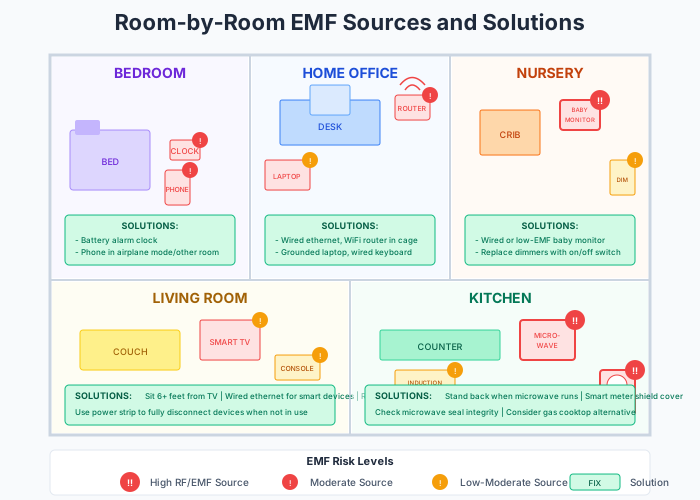
Three types of electromagnetic fields exist in residential settings. Radiofrequency (RF) radiation comes from wireless devices like WiFi routers, cell phones, cordless phones, and smart home devices. Electric fields emanate from electrical wiring in your walls, even when devices are turned off. Magnetic fields generate from current flowing through wires and electrical appliances during operation.
Each room in your home presents unique challenges and opportunities for EMF reduction. The key principle remains consistent: distance is your greatest ally, followed by shielding and elimination of unnecessary sources.
Check your EMF exposure
See cell towers, power lines, and substations near any US address.
Search Your AddressBedroom: Creating Your Sleep Sanctuary
The bedroom deserves top priority in any EMF-reduction strategy. Adults spend approximately 7-9 hours sleeping each night, making cumulative exposure during this period substantial. Sleep quality may be affected by EMF exposure, with some research suggesting impacts on melatonin production and sleep architecture.
EMF Kill Switches: The Ultimate Bedroom Solution
An EMF kill switch (also called a demand switch or circuit cut-off switch) automatically disconnects power to designated circuits when no current is being drawn. This eliminates electric fields from bedroom wiring during sleep hours without requiring you to flip breakers manually each night.
Installation involves wiring a specialized switch into your electrical panel that monitors the circuits serving your bedroom. When you turn off all lights and unplug devices, the switch detects zero current draw and disconnects the circuit entirely. A small pilot light typically runs on a separate circuit to confirm the system is working.
Professional installation costs between $200-500 depending on your electrical panel configuration and the number of circuits involved. The investment pays dividends in creating a truly low-EMF sleep environment that requires no daily effort to maintain.
Device-Free Sleep Zone
Remove all wireless devices from your bedroom entirely. This includes cell phones, tablets, smartwatches, wireless speakers, and baby monitors. If you use your phone as an alarm, switch to a battery-powered alarm clock and charge your phone in another room.
Cordless phone base stations are particularly problematic as they broadcast continuously, even when not in use. Replace cordless phones with corded alternatives, or at minimum, relocate base stations far from sleeping areas.
Distance from Electrical Panels
Electrical panels generate significant magnetic fields during operation. If your bedroom shares a wall with your home’s main electrical panel, consider rearranging furniture to position your bed on the opposite wall. A minimum distance of 6-8 feet from the panel is recommended where possible.
Similarly, identify what’s on the other side of your bedroom walls. A refrigerator, HVAC unit, or other high-draw appliance on the adjacent wall can create elevated magnetic field exposure at your headboard.
Bedroom Implementation Checklist
- Install an EMF kill switch on bedroom circuits
- Remove all wireless devices including phones and tablets
- Replace cordless phones with corded alternatives
- Position bed away from electrical panels and major appliances
- Use battery-powered alarm clocks
- Consider unplugging bedside lamps (or use kill switch)
- Check adjacent rooms for hidden EMF sources
Living Room: Balancing Connectivity and Exposure
The living room typically houses your WiFi router, smart TV, gaming consoles, and various connected devices. Complete elimination of wireless technology may not be practical here, but strategic management significantly reduces exposure.
Router Placement and Management
WiFi router placement matters enormously. Position your router as far from frequently occupied seating areas as possible—ideally in a basement, garage, attic, or dedicated utility closet. The signal will still reach throughout your home, but your direct exposure decreases dramatically with distance.
Router timers offer a simple, automated solution for reducing nighttime exposure. These devices plug between your router and the wall outlet, cutting power during preset hours (typically 10 PM to 6 AM). Your home becomes WiFi-free during sleeping hours without requiring any daily action. Basic mechanical timers cost under $10; smart versions with app control run $20-40.
Consider reducing your router’s transmission power if the option exists in your router’s settings. Most routers broadcast at maximum power by default, which is unnecessary for typical home coverage. Reducing power by 25-50% can meaningfully decrease RF levels while maintaining adequate connectivity.
Hardwired Alternatives
Ethernet connections eliminate RF exposure entirely while providing faster, more reliable internet than WiFi. Modern homes can be retrofitted with ethernet using various approaches:
Ethernet over Powerline (Powerline adapters): These devices transmit internet signals through your existing electrical wiring. Plug one adapter near your router, another near your TV or computer, and connect via ethernet cables. Quality varies by brand and home wiring condition, with speeds typically ranging from 200-2000 Mbps.
MoCA adapters: If your home has coaxial cable infrastructure, MoCA (Multimedia over Coax Alliance) adapters convert these cables into a high-speed ethernet network, often achieving speeds over 1 Gbps.
Direct ethernet runs: For permanent solutions, running ethernet cable through walls provides the cleanest setup. Professional installation typically costs $100-200 per drop, or significantly less as a DIY project.
Smart TV Considerations
Smart TVs constantly communicate with servers for updates, recommendations, and data collection—even when you’re not streaming content. Hardwire your TV via ethernet and disable WiFi in the settings menu to eliminate this constant RF emission.
If hardwiring isn’t practical, disable features you don’t use. Turn off voice assistants, automatic content recognition, and background app refresh. These reductions won’t eliminate RF exposure but will decrease transmission frequency and duration.
Kitchen: Addressing High-Power Sources

Kitchens contain some of the highest-powered appliances in your home, along with potential smart meter exposure. The transient nature of kitchen occupancy means absolute minimization is less critical than in bedrooms, but sensible practices still apply.
Smart Meter Shielding
Smart meters transmit usage data wirelessly, typically using RF signals in the 900 MHz or 2.4 GHz range. Transmission frequency varies by utility—some meters send data every few seconds, others every few hours. Check with your utility company to understand your meter’s transmission schedule.
Smart meter shielding covers attach directly to the meter, blocking RF emissions on the side facing your home while allowing the utility-facing side to communicate. Quality shields reduce RF penetration by 90-98% without affecting meter function or violating utility regulations in most jurisdictions.
Installation is straightforward: the shield fits over the glass dome of the meter and typically secures with screws or straps. Costs range from $30-100 depending on materials and coverage area. Some homeowners also apply RF shielding paint to the interior wall directly behind the meter for additional protection.
Check your address with EMF Radar to identify nearby cell towers and other RF sources that may affect your kitchen area.
Appliance Distance and Use Patterns
Maintain distance from appliances during operation, particularly microwaves, induction cooktops, and refrigerator compressors. The inverse square law works in your favor—doubling your distance reduces exposure by 75%.
Microwave ovens, despite their name, primarily create concern through magnetic field generation and potential RF leakage rather than “microwave radiation” entering your food. Standing 3-4 feet away during operation substantially reduces exposure. Regular inspection of door seals ensures no RF leakage occurs.
Induction cooktops generate strong magnetic fields during operation. While these fields drop off rapidly with distance, users with pacemakers or other medical devices should maintain extra distance and consult their physicians.
Home Office: Where Work Meets Wellness
Home offices concentrate technology in spaces where people spend extended focused hours. The combination of computers, monitors, phones, and wireless peripherals creates layered exposure that benefits significantly from intentional design.
Wired Ethernet: The Foundation
Every home office should prioritize ethernet connectivity. Disable WiFi on your laptop or desktop when connected via ethernet—having both active provides no benefit and doubles your RF exposure sources.
Extend wired connectivity to peripherals where possible. USB-connected keyboards and mice eliminate the RF emissions from Bluetooth alternatives. Wired headsets replace Bluetooth earbuds for calls and audio.
Phone Distance and Habits
Cell phones represent the highest-powered RF source most people encounter daily. During focused work, place your phone across the room rather than on your desk. Use speakerphone or wired headsets for calls rather than holding the device against your head.
Airplane mode eliminates all RF emissions while maintaining access to offline features like notes, timers, and downloaded content. Consider using airplane mode during deep work sessions when incoming calls aren’t necessary.
Monitor Placement and Considerations
Computer monitors generate electric and magnetic fields from their internal electronics. Position monitors at arm’s length (approximately 20-28 inches) from your face. This distance benefits both EMF reduction and eye health.
LCD monitors generally produce lower EMF levels than older CRT monitors, though variance exists between manufacturers and models. If concerned, an EMF meter can identify whether your specific monitor produces elevated fields.
Home Office Implementation Priorities
- Connect via ethernet and disable WiFi on computer
- Use wired keyboard, mouse, and headset
- Place phone across the room during work
- Position monitor at arm’s length
- Consider laptop positioning—on desk, not lap
Children’s Rooms: Special Considerations
Children’s developing bodies may be more susceptible to environmental exposures, making their rooms particularly important to address. Their thinner skulls, higher tissue conductivity, and longer lifetime exposure potential warrant extra precaution.
WiFi and Wireless Devices
Remove WiFi-connected devices from children’s rooms entirely where possible. This includes tablets, smart speakers, gaming consoles with wireless connectivity, and WiFi-enabled baby monitors.
Baby monitors deserve special attention. Analog audio monitors produce significantly less RF than digital or video monitors. If video monitoring is desired, wired camera systems eliminate RF exposure entirely. Position any monitor at maximum practical distance from the crib or bed.
Electronics-Free Sleep
Establish children’s rooms as screen-free zones, particularly in the hours before bed. This practice reduces EMF exposure while supporting healthy sleep hygiene. Charging stations for family devices can be located in common areas rather than bedrooms.
Educational Technology
School-issued tablets and laptops increasingly contain always-on WiFi that cannot be disabled. When these devices must be in children’s rooms, power them off completely (not just sleep mode) when not in use, and position them away from sleeping areas.
Whole-Home Solutions: RF Shielding Paint
RF shielding paint contains metallic particles (typically carbon, nickel, or copper) that block radio frequency signals when applied to walls and ceilings. Professional-grade paints can achieve 99%+ RF attenuation when properly applied.
Application Requirements
Shielding paint requires proper grounding to function effectively. Without grounding, the paint may actually concentrate electric fields rather than eliminate them. Professional installation is recommended, particularly for the grounding component.
Application involves two coats minimum, covering all surfaces completely including behind outlets and switch plates. Any gaps in coverage create pathways for RF penetration, reducing overall effectiveness.
Cost runs $100-200 per gallon, with one gallon covering approximately 50 square feet per coat. A typical bedroom requires 2-4 gallons depending on size and number of windows. Professional installation adds $500-1500 depending on room size and complexity.
Window Film and Curtains
RF-blocking window film applies directly to glass, blocking wireless signals from external sources like cell towers and neighbors’ WiFi networks. Quality films achieve 90-99% RF reduction while remaining optically clear.
RF-blocking curtains offer a non-permanent alternative, particularly useful in rental properties where permanent modifications aren’t permitted. These curtains contain metallic mesh that blocks RF when closed, while allowing normal window function when open.

Router Timers and Automated Solutions
Automating EMF reduction ensures consistency without requiring daily effort. Router timers represent the simplest and most impactful automation for most households.
Timer Options
Mechanical timers: Simple, reliable, and inexpensive ($5-15). Set pins for on/off times and the timer handles the rest. No WiFi or app required—they work purely mechanically.
Smart plugs with scheduling: These allow more precise scheduling and remote control via smartphone apps. However, they themselves produce some RF emissions, somewhat contradicting the purpose.
Router-integrated scheduling: Many modern routers include built-in scheduling features accessible through the admin interface. This approach eliminates the need for external hardware and allows per-device or whole-network scheduling.
Recommended Schedules
A conservative approach powers off WiFi from 10 PM to 6 AM, covering sleeping hours for most households. Families with varied schedules may prefer 11 PM to 7 AM or adjust based on the last person to bed.
Weekend schedules can differ from weekdays if your family’s patterns change. Some families extend WiFi-off periods during daytime hours when away at work and school.
Hardwired Alternatives to WiFi
Complete WiFi elimination remains possible for households willing to invest in infrastructure. The resulting environment produces zero RF from networking while often improving speed and reliability.
Full Ethernet Networks
New construction can incorporate ethernet drops throughout the home at minimal marginal cost. Retrofit projects involve more effort but remain achievable through professional installation or determined DIY work.
Plan for multiple ethernet drops per room: televisions, gaming consoles, streaming devices, and computers each benefit from dedicated connections. Centralize drops at a network switch located in a utility area.
USB Ethernet Adapters
Modern laptops increasingly lack built-in ethernet ports, but USB-C and USB-A ethernet adapters restore wired capability instantly. Quality adapters supporting gigabit speeds cost $15-30 and work immediately on most operating systems.
Phone Alternatives
VoIP (Voice over Internet Protocol) phones work over your ethernet network, eliminating the need for wireless cordless phones. Services like Google Voice, Ooma, and others provide home phone capability over your existing internet connection.
Traditional landlines remain available from most phone companies and produce minimal EMF—just the electric and magnetic fields from the physical wiring.
Related Reading
- Understanding EMF Measurements: A Complete Guide
- Cell Tower Setbacks: How Distance Affects Exposure
- Smart Meters Explained: What You Need to Know
- The Science of EMF Shielding Materials
- Bedroom EMF Optimization: A Deep Dive
Frequently Asked Questions
How much does whole-home EMF-proofing cost?
Basic strategies like device removal, router timers, and furniture rearrangement cost nothing. Mid-range investments including ethernet adapters, powerline networking, and smart meter shields run $200-500. Comprehensive approaches with kill switches, shielding paint, and professional ethernet installation can reach $5,000-15,000 depending on home size and scope.
Can I EMF-proof a rental apartment?
Yes, though permanent modifications like kill switches and shielding paint typically aren’t options. Focus on router timers, hardwired connections using powerline adapters, device removal from bedrooms, RF-blocking curtains, and portable shielding solutions. All of these can move with you to your next home.
Will shielding my home block cell phone signals?
Properly installed RF shielding will significantly reduce cell signal inside shielded areas. Many homeowners consider this a feature rather than a bug—it forces phone use to unshielded areas or outdoors. If cell connectivity is essential throughout your home, shield selectively (bedrooms only) rather than whole-house.
Do EMF bed canopies actually work?
Conductive fabric bed canopies can create a shielded sleeping environment, blocking RF from all directions when properly constructed and grounded. Quality matters significantly—cheap canopies may not achieve meaningful attenuation. They offer a non-permanent alternative to shielding paint for bedrooms.
How do I know if my EMF-proofing is working?
An EMF meter allows before-and-after measurements to verify reduction. Quality RF meters start around $200; combination meters measuring RF, electric, and magnetic fields run $500-1000. Some EMF consultants offer home assessments including measurement and recommendations for $300-600.
Should I worry about EMF from neighbors’ WiFi?
Neighboring WiFi networks contribute to your RF environment, particularly in apartments and attached homes. Window film, strategic furniture placement, and shielding paint on shared walls can address neighbor sources. In detached homes, distance typically reduces neighbor WiFi to minimal levels.
The Bottom Line
EMF-proofing your home doesn’t require eliminating all technology or spending thousands of dollars. Start with the highest-impact, lowest-cost changes: relocate your router away from living areas, implement a router timer for nighttime hours, remove wireless devices from bedrooms, and prioritize ethernet connections where practical.
These foundational changes address the majority of controllable EMF exposure in most homes. From there, assess your comfort level and budget for additional measures like kill switches, shielding materials, and whole-home hardwiring.
The bedroom remains the single most important room to address. You spend one-third of your life sleeping, and that time should occur in the lowest-EMF environment possible. A kill switch, device-free room, and attention to adjacent-room sources creates a true sleep sanctuary that requires minimal ongoing effort.
Check your address with EMF Radar to understand external EMF sources affecting your home, then apply these room-by-room strategies to address internal sources within your control. The goal isn’t perfection—it’s meaningful reduction in the exposures that matter most.
Related Reading
- How to Reduce EMF in Your Apartment — renter-friendly strategies when you can’t modify your space