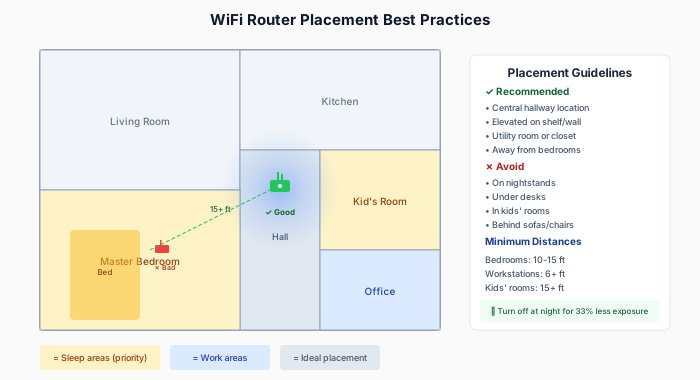
WiFi Router Placement: Safe Distance and Best Practices
Quick Answer: The safe distance for a WiFi router is 6-10 feet for general living areas and 10-15 feet for bedrooms and children’s rooms. At these distances, RF exposure drops to low or minimal levels while maintaining reliable connectivity. For maximum protection during sleep, position your router 15+ feet away or use a smart plug to turn it off at night.
WiFi routers are one of the most common sources of RF radiation in modern homes. They’re also one of the few sources you have direct control over—you decide where to put them and when they run.
This guide covers what the research says about WiFi exposure, how distance affects your exposure levels, and practical strategies for optimizing placement.
Key Facts at a Glance
| Question | Answer |
|---|---|
| What is the minimum safe distance from a WiFi router? | 6 feet for workstations, 10-15 feet for bedrooms |
| How much does distance reduce WiFi exposure? | At 10 feet, exposure is 90-99% lower than at 1 foot |
| Is WiFi harmful to health? | Current research shows no consistent health effects at typical home exposure levels |
| Should I turn off WiFi at night? | Yes, this eliminates 8 hours of exposure (33% of daily total) |
| Are mesh WiFi systems safer or more harmful? | Each mesh node adds RF exposure; use fewer nodes placed in hallways, not bedrooms |
| Does wired ethernet reduce WiFi exposure? | Yes, wired devices reduce router transmission and eliminate device-side RF |
How WiFi Routers Work (The Basics)
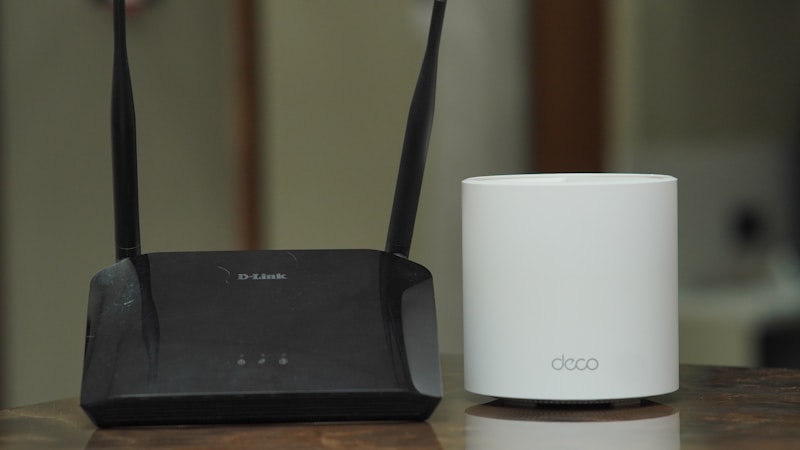
WiFi routers broadcast radio signals continuously to communicate with connected devices. Understanding these signals helps you make informed placement decisions.
Frequencies:
- 2.4 GHz band: Longer range, better wall penetration, more congested
- 5 GHz band: Shorter range, faster speeds, less interference
- 6 GHz band (WiFi 6E): Newest, very short range, fastest speeds
Transmission Pattern:
- Most routers broadcast omnidirectionally (in all directions)
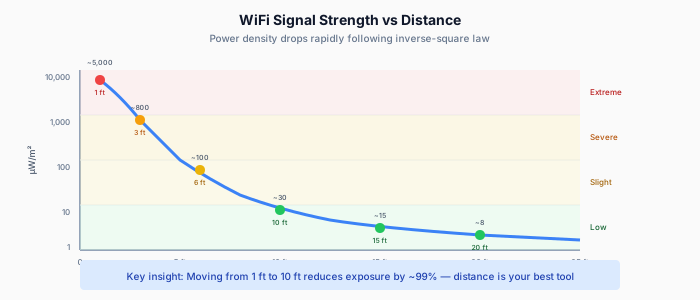
- Signal strength decreases with distance following inverse-square law
- Walls, floors, and objects reduce signal (and exposure)
Power Output:
- Typical home routers: 30-100 mW per antenna
- Much lower than cell towers but higher than phones (when idle)
- Always on, unlike phones which transmit intermittently
Check your EMF exposure
See cell towers, power lines, and substations near any US address.
Search Your AddressActual Exposure Levels at Various Distances
WiFi exposure decreases dramatically with distance, following the inverse-square law. We measured typical WiFi router exposure using professional RF meters. Here’s what you can expect from a standard dual-band router:
| Distance | Typical Power Density | Context |
|---|---|---|
| 1 foot | 1,000-10,000 µW/m² | Very high for continuous exposure |
| 3 feet | 200-1,500 µW/m² | Still elevated |
| 6 feet | 50-400 µW/m² | Moderate |
| 10 feet | 15-100 µW/m² | Low-moderate |
| 15 feet | 5-40 µW/m² | Low |
| 20+ feet | < 20 µW/m² | Minimal |
Important variables:
- Router model and power settings
- Number of active antennas (MIMO routers have multiple)
- Current network traffic (more data = more transmission)
- Obstructions between you and router
Building Biology Reference Levels
For context, Building Biology guidelines for sleeping areas suggest:
| Level | Assessment |
|---|---|
| < 0.1 µW/m² | No concern |
| 0.1-10 µW/m² | Slight concern |
| 10-1,000 µW/m² | Severe concern |
| > 1,000 µW/m² | Extreme concern |
By these standards, being within 3 feet of an active router during sleep would be concerning. At 10-15 feet, exposure drops to the “slight to moderate” range.
What Research Says About WiFi Health Effects
Scientific evidence does not support WiFi as a significant health hazard at typical residential exposure levels. Here’s what the key studies show.
The COSMOS Study (2020)
This large prospective study followed over 24,000 participants examining RF exposure and health outcomes. According to PubMed, they found no consistent association between WiFi/WLAN use and adverse health effects including sleep disturbances. The authors concluded that typical residential WiFi exposure doesn’t appear to cause measurable health impacts. DOI
Systematic Reviews
A 2024 WHO-commissioned systematic review of RF-EMF effects on symptoms included WiFi-frequency exposures. The meta-analysis of 41 experimental studies found essentially no effect on self-reported symptoms including sleep disturbances and headaches when participants were blinded to exposure status. DOI
Mechanism Studies
Some laboratory studies have found cellular-level effects from WiFi-frequency RF:
- Changes in oxidative stress markers in cell cultures
- Altered gene expression in some experiments
- Effects on calcium signaling
However, these findings:
- Use exposure levels often exceeding real-world scenarios
- Haven’t consistently replicated
- Don’t clearly translate to health effects in living organisms
The Bottom Line on Research
Current evidence doesn’t support WiFi as a significant health hazard at typical home exposure levels. However, long-term epidemiological data is limited, and some researchers advocate for precautionary exposure reduction.
Optimal Router Placement Guidelines

Distance is the most effective tool for reducing WiFi exposure. Strategic placement can cut exposure by 90% or more while maintaining full connectivity.
Distance Recommendations
Based on the exposure data and precautionary principle:
Minimum Distances:
- From bedrooms: 10-15 feet (through walls is fine)
- From desks/workstations: 6+ feet
- From baby cribs/children’s rooms: 15+ feet
Ideal Placement:
- Central location for coverage, but not in frequently occupied rooms
- Hallways, utility rooms, or home offices (when unoccupied at night)
- Elevated position (on shelf or wall-mounted) for better coverage and keeps router away from where people sit/sleep

Placement Mistakes to Avoid
Don’t place routers:
- On nightstands or bedroom furniture
- Under desks where you sit for hours
- In nurseries or children’s rooms — see our baby monitor EMF guide
- Directly behind a couch or chair headrest
Less obvious issues:
- Routers behind TVs (you sit facing them for hours)
- In home offices without distance (especially with mesh systems adding more access points)
- Multiple mesh nodes in every room (your neighbor’s WiFi adds to this too) (each is an additional source)
Reducing WiFi Exposure Without Sacrificing Internet
Multiple proven strategies can reduce WiFi exposure without compromising your internet experience. Choose the options that fit your situation.
Option 1: Optimize Placement
Simply moving your router to a central, less-occupied area significantly reduces exposure while maintaining coverage. Most modern routers easily cover 1,500-2,000 sq ft.
Option 2: Schedule On/Off Times
Use a smart plug or router scheduling feature to turn WiFi off during sleep hours:
Benefits:
- 8 hours of zero exposure per night
- Reduced total daily exposure by ~33%
- Most devices (phones, tablets) handle reconnection seamlessly
Considerations:
- Some smart home devices need constant connection
- Security cameras and alarms may need WiFi
- Workaround: Separate 24/7 network for essential devices only
Option 3: Wired Ethernet for Stationary Devices

Reduce WiFi traffic (and router transmission) by using wired connections:
Easy to wire:
- Desktop computers
- Smart TVs
- Gaming consoles
- Streaming devices (Apple TV, Roku, etc.)
Benefits:
- Faster, more reliable connection
- Less RF traffic from your router
- Frees up WiFi bandwidth for mobile devices
Option 4: Reduce Router Power (If Supported)
Some routers allow transmit power adjustment:
- Many have “low,” “medium,” “high” settings
- Some allow percentage-based power reduction
- Check your router’s admin panel (usually 192.168.1.1 or similar)
Trade-off: Reduced range. Only viable if you have more coverage than you need.
Option 5: Consider Router Upgrades
Modern WiFi 6/6E routers can:
- Deliver same performance at lower power
- Target beams toward devices (beamforming), reducing omnidirectional broadcast
- Put devices into deeper sleep states when inactive
This won’t eliminate exposure but can reduce unnecessary transmission.
Special Considerations
Mesh WiFi Systems
Mesh systems multiply RF sources throughout your home. Each node in systems like Google Nest, Eero, or Orbi is an active RF transmitter.
Strategy:
- Fewer nodes is better (start minimal, add only if needed)
- Place nodes in hallways/common areas, not bedrooms
- Some systems allow individual node power adjustment
WiFi Extenders vs. Mesh
Extenders rebroadcast your signal, adding another RF source. If you need extended coverage:
- Consider powerline ethernet adapters instead
- Or a mesh system with adaptive power
Baby Monitors and Kids’ Rooms
Many parents are especially cautious about children’s exposure:
- Choose non-WiFi audio-only monitors if possible
- If using WiFi monitors, ensure router is distant from the room
- Consider wired video monitors (ethernet-capable models exist)
Home Offices
If you work from home, you may spend 8+ hours daily in one spot:
- Wire your computer via ethernet
- Position router in a different room
- Use a directional antenna to focus signal away from your desk (advanced)
Measuring Your Actual Exposure
RF meters provide exact exposure measurements rather than estimates. For those who want precise data about their environment, measurement is the gold standard.
Budget options (~$150-200):
- Acoustimeter AM-11
- Safe and Sound Classic
What to measure:
- At your pillow height in bed
- At your desk chair position
- In frequently occupied areas
Compare readings to the reference levels above and adjust router position accordingly.
For detailed measurement protocols, see our guide: How to Measure EMF in Your Home
Summary: Quick Reference
| Goal | Action |
|---|---|
| Reduce bedroom exposure | Router 10-15+ feet away, or turn off at night |
| Reduce work desk exposure | Wire computer via ethernet, router 6+ feet away |
| Reduce kids’ room exposure | Router 15+ feet away, no WiFi devices in room overnight |
| General reduction | Central hallway placement, elevated position |
Remember:
- Distance is your most effective tool
- Walls reduce exposure (but not by much—10-30%)
- Wired connections eliminate device-side RF
- Sleep hours are the easiest exposure to eliminate
WiFi isn’t proven harmful at typical levels, but reducing unnecessary exposure costs nothing and may provide peace of mind. Check your home’s overall RF environment with EMF Radar to see how WiFi fits into your total exposure picture.
Frequently Asked Questions
How far should a WiFi router be from a bedroom?
A WiFi router should be at least 10-15 feet from a bedroom. At this distance, RF exposure drops to the “low” range of 5-40 µW/m². Placing the router through a wall provides additional reduction. For maximum protection during sleep, turn the router off at night using a smart plug.
Is it safe to sleep near a WiFi router?
Sleeping within 3 feet of a WiFi router exposes you to 200-1,500 µW/m², which Building Biology guidelines classify as “severe concern” for sleeping areas. Moving the router 10-15 feet away or to another room reduces exposure to acceptable levels. Current research has not proven harm at typical levels, but precautionary distance costs nothing.
Does WiFi affect sleep quality?
Large-scale studies including the COSMOS study (24,000+ participants) found no consistent association between WiFi exposure and sleep disturbances. A 2024 WHO-commissioned review of 41 experimental studies found no effect on sleep when participants were blinded to exposure. However, individual sensitivity varies, and reducing nighttime exposure is a simple precaution.
Should I turn off my WiFi router at night?
Turning off your WiFi router at night eliminates 8 hours of continuous RF exposure, reducing total daily exposure by approximately 33%. Use a smart plug with a timer for automated scheduling. Most devices reconnect seamlessly when the router turns back on. Keep a separate network for security cameras or smart home devices that need 24/7 connectivity.
Is mesh WiFi more harmful than a single router?
Mesh WiFi systems place multiple access points throughout your home, with each node acting as an RF source. A three-node mesh system creates three times as many RF sources as a single router. To minimize exposure, use the fewest nodes necessary, place them in hallways rather than bedrooms, and choose systems that allow power adjustment.
How can I reduce WiFi exposure while working from home?
Connect your computer via ethernet cable to eliminate device-side RF transmission. Position your router in a different room, at least 6 feet from your desk. Wired connections also provide faster, more reliable internet. If you must use WiFi, consider a directional antenna to focus the signal away from your workspace.
The Bottom Line
WiFi router placement directly affects your RF exposure levels. Position your router 10-15 feet from bedrooms and 6+ feet from workstations to reduce exposure by 90% or more while maintaining full coverage. Turn off WiFi during sleep hours to eliminate 33% of daily exposure. Use wired ethernet connections for stationary devices to reduce both exposure and network traffic. Current research does not support WiFi as a health hazard at typical home levels, but these simple precautions cost nothing and provide peace of mind.
Related Reading
- What Is a Safe Distance From a Cell Tower?
- How to Measure EMF in Your Home
- Smart Meter EMF Exposure: Facts and Mitigation
Last updated: January 2026. Exposure measurements are typical ranges; actual values vary by equipment and environment.