EMF Radiation from Neighbor’s WiFi: Should You Be Concerned?
You open your phone’s WiFi settings and see 15 networks. Some have strong signals. Your neighbor’s “FBI_Surveillance_Van_3” is coming through loud and clear. If you can detect their WiFi, does that mean you’re being bathed in their RF radiation?
It’s a reasonable worry, especially in apartments, townhouses, and densely packed neighborhoods where you’re surrounded by dozens of WiFi networks. Let’s look at what the measurements actually show.

How WiFi Signals Work (Quick Physics)
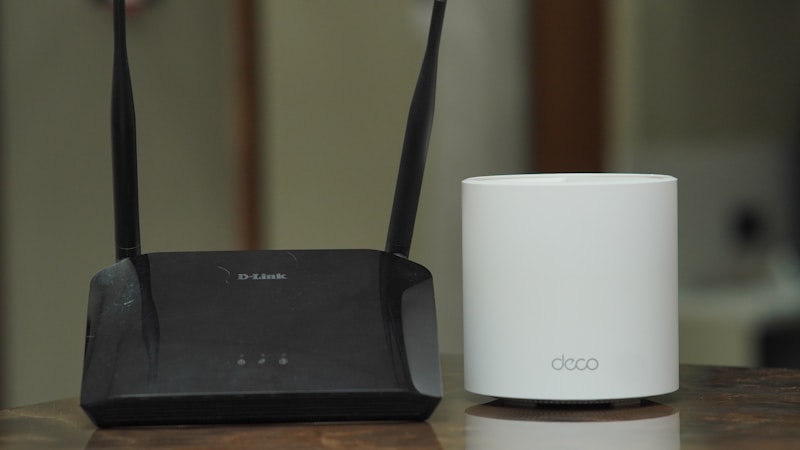
A WiFi router is a low-power radio transmitter. Here are the basics:
Transmit power: Most consumer routers operate at 50–200 milliwatts (0.05–0.2 watts). This is roughly 100–1,000 times less powerful than a cell tower and about equal to a Bluetooth speaker.
Frequencies:
- 2.4 GHz: Penetrates walls better, travels farther
- 5 GHz: Faster speeds, shorter range, blocked more by walls
- 6 GHz (WiFi 6E): Even shorter range, even more wall attenuation
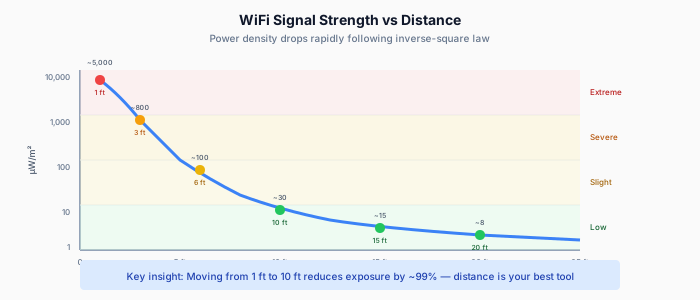
How signals weaken: WiFi signal strength follows the inverse-square law — double the distance, and power drops to one-quarter. But walls, floors, and other obstacles add additional attenuation on top of that.
Key insight: Your phone can detect a WiFi signal at -80 dBm (which is 0.00000001 milliwatts). Your phone is incredibly sensitive. The fact that you can see a network doesn’t mean you’re receiving meaningful RF energy from it.
What Do Measurements Actually Show?

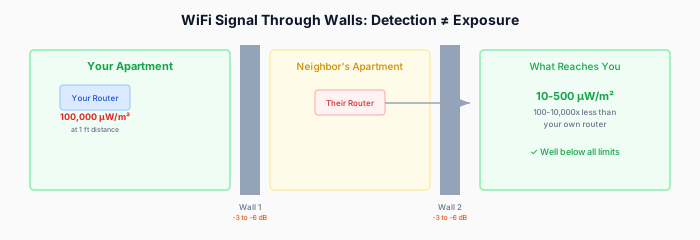
Here’s where this gets concrete. Let’s trace the RF from a neighbor’s router to your living space:
Starting point: Their router
| Distance from Router | Typical Power Density |
|---|---|
| 30 cm (right next to it) | 10–40 µW/cm² |
| 1 meter | 1–5 µW/cm² |
| 3 meters | 0.1–0.5 µW/cm² |
Through one standard interior wall
A typical interior drywall wall attenuates WiFi by about 3–5 dB, which means it reduces the signal to roughly 30–50% of its original strength.
If your neighbor’s router is 3 meters from the shared wall, and you’re 2 meters on your side:
- Total distance: ~5 meters + wall loss
- Expected power density on your side: 0.01–0.1 µW/cm²
Through an exterior wall or concrete partition
Exterior walls, brick, or concrete attenuate WiFi by 10–20 dB — that’s a 90–99% reduction.
Same scenario with a concrete wall between units:
- Expected power density on your side: 0.001–0.01 µW/cm²
Through a floor/ceiling (upstairs/downstairs neighbor)
Floors with concrete, rebar, or even standard wood framing plus subfloor typically attenuate by 10–15 dB:
- Expected power density one floor away: 0.001–0.05 µW/cm²
The cumulative effect of many neighbors
What about 10 or 20 WiFi networks? Wouldn’t they add up?
Technically yes, RF power is additive. But here’s the math:
- 1 neighbor’s WiFi at your location: 0.01 µW/cm²
- 15 neighbors’ WiFi (all directions, various distances): Sum might reach 0.05–0.15 µW/cm²
Even with 15 networks piling up, the total is still orders of magnitude below safety limits (1,000 µW/cm² at WiFi frequencies per FCC) and significantly below what your OWN router produces at typical room distances.
Check your EMF exposure
See cell towers, power lines, and substations near any US address.
Search Your AddressPutting It in Perspective
| RF Source | Power Density at Typical Exposure Distance |
|---|---|
| Your phone (at ear) | 100–1,000 µW/cm² |
| Your WiFi router (1m) | 1–5 µW/cm² |
| Your laptop WiFi (at lap) | 0.5–3 µW/cm² |
| Your microwave (30cm, running) | 5–50 µW/cm² |
| All neighbor WiFi combined | 0.01–0.15 µW/cm² |
| Cell tower (200m away) | 0.01–0.5 µW/cm² |
| FCC safety limit (2.4 GHz) | 1,000 µW/cm² |
Your neighbor’s WiFi typically produces 10–500 times less RF at your location than your own router, and 1,000–100,000 times less than your phone against your head.
Why You Can See Their Network but Barely Receive Their RF
This confuses a lot of people, so it’s worth explaining.
Your WiFi-enabled devices have extremely sensitive receivers. A modern WiFi chip can detect signals as weak as -90 to -95 dBm. To put that in human terms:
- -30 dBm = 1 microwatt (next to the router)
- -50 dBm = 0.00001 microwatt (same room)
- -70 dBm = 0.0000001 microwatt (through a wall)
- -90 dBm = 0.000000001 microwatt (barely detectable)
When your phone shows your neighbor’s network with one bar at -75 dBm, the actual power reaching your phone’s antenna is approximately 0.00000003 milliwatts. That’s about 30 picowatts. For reference, a firefly produces about 30 microwatts of visible light — a million times more energy than that WiFi signal.
The network appears on your list because your phone is an engineering marvel of sensitivity, not because the signal is strong.
The 2.4 GHz vs. 5 GHz Factor
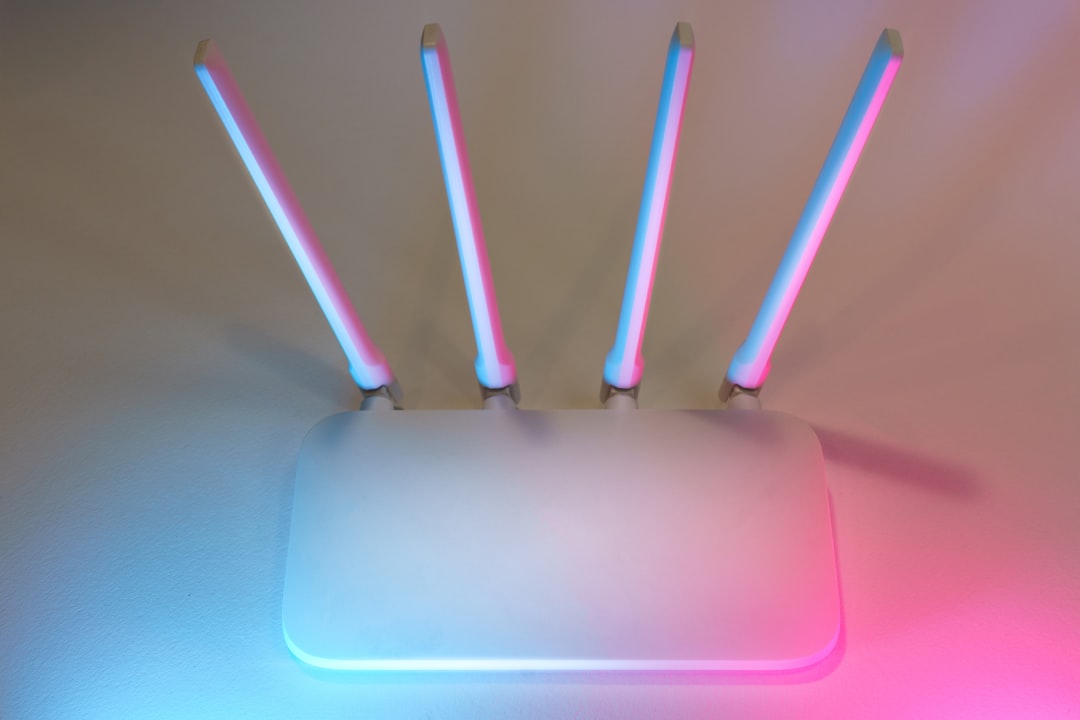
If your concern is specifically about RF penetrating from neighbors:
2.4 GHz WiFi:
- Penetrates walls better (lower frequency = longer wavelength = better diffraction)
- Most of the neighbor networks you see are probably 2.4 GHz
- Travels farther but at increasingly weak levels
5 GHz WiFi:
- Attenuated much more by walls (roughly 2–3x the dB loss per wall)
- You may not even see a neighbor’s 5 GHz network
- Carries more data but dies faster through obstacles
6 GHz (WiFi 6E):
- Even more wall attenuation than 5 GHz
- Rarely detectable from a neighboring unit
- Shortest range of all WiFi bands

As WiFi technology moves toward higher frequencies (5 GHz and 6 GHz), neighbor-to-neighbor RF leakage actually decreases. The trend in WiFi technology is toward shorter range but higher speed — which coincidentally reduces your exposure to everyone else’s networks.
When Neighbor’s WiFi Actually Matters

In most situations, neighboring WiFi is an RF non-issue. But there are a few edge cases:
Thin walls, very close quarters
In some older apartment buildings with thin drywall partitions and no insulation, a neighbor’s router mounted right on the shared wall could produce noticeable RF on your side — potentially 0.5–2 µW/cm² at the wall surface.
If you suspect this:
- Check where your neighbor’s router is (ask them, or use a WiFi analyzer app to see signal strength along your wall)
- Measure with an RF meter at the shared wall
- If levels are elevated right at the wall, simply don’t put your bed, desk, or couch directly against it
Multiple access points (mesh networks)
Some neighbors run mesh WiFi systems with 3–4 access points distributed throughout their home. If one is close to your shared wall, it’s like having their router right next to you. The same wall-distance management applies.
Commercial installations nearby
If you live above a business (coffee shop, co-working space, etc.) that runs commercial WiFi with multiple high-power access points, the cumulative RF can be measurably higher than residential WiFi. Commercial access points sometimes transmit at 500–1,000 mW — 5–10x more than home routers.
What You Can Actually Do
If you want to reduce RF from ALL WiFi sources (yours and neighbors’):
1. Manage your own router first (biggest impact):
- Place your router in a room you don’t sleep in
- Use ethernet for stationary devices (computer, TV, gaming console)
- Consider turning WiFi off at night if you don’t need it
- Your own router typically produces 10–100x more RF exposure than all neighbors combined — see our guide on WiFi router safe distance
2. Rearrange strategically:
- Don’t place your bed or primary work desk against a wall shared with a neighbor
- Interior rooms have more shielding from external WiFi sources than rooms with thin walls or windows
3. Use 5 GHz or 6 GHz on YOUR network:
- Better performance AND shorter range means less RF spread to your neighbors (and from them to you)
- Most modern devices support 5 GHz
4. WiFi-blocking solutions (usually overkill for neighbor WiFi):
- RF-blocking paint on a shared wall: effective but permanent and expensive ($50–100/gallon)
- Metallic wallpaper or aluminum-backed insulation: effective but may affect your own WiFi
- RF-blocking curtains: only useful for windows, not walls
Honestly, for most people concerned about neighbor WiFi specifically, steps 1 and 2 are all you need. Moving your bed 2 feet from a shared wall and placing your own router in the living room instead of the bedroom will have far more impact than any shielding.
If you live in a very dense environment (apartment complex, dorm):
- Consider a wired-only setup: Ethernet for everything, WiFi disabled on your router
- For phones/tablets that need wireless: Use a low-power access point with the power turned down, placed centrally in your unit
- This eliminates your own contribution to the RF environment while reducing your exposure to the absolute minimum achievable in a shared building
A Note on EMF Sensitivity
Some people report symptoms like headaches, fatigue, or sleep disruption that they attribute to WiFi exposure — sometimes specifically from neighbors’ networks. This experience is real and worth acknowledging.
What the research shows:
- Double-blind provocation studies (where people who report WiFi sensitivity try to detect WiFi being turned on/off) have generally not found that self-reported sensitive individuals can detect WiFi at rates better than chance
- This doesn’t mean the symptoms aren’t real — it suggests the mechanism might not be direct RF detection
- Stress, anxiety about exposure, and the nocebo effect (expecting to feel bad → feeling bad) are well-documented factors
If you’re experiencing symptoms you attribute to neighbor WiFi:
- Measure first — verify that RF levels in your home are actually elevated (they usually aren’t from neighbors alone)
- Address your own sources — your router and devices almost certainly contribute more
- Consider other environmental factors — air quality, light exposure, noise, and sleep hygiene all affect the symptoms commonly attributed to EMF
- Talk to your doctor — especially if symptoms are persistent, regardless of suspected cause
The Real WiFi Concerns (Not RF)
Ironically, the biggest legitimate concerns about neighbor WiFi have nothing to do with EMF:
- Channel interference: Too many networks on the same channel degrades everyone’s performance
- Security: Open or poorly secured networks near yours could be security risks
- Privacy: Some network names inadvertently reveal information
- Sleep disruption from devices: The blue light and stimulation from WiFi-connected devices (phones, tablets) in bed demonstrably disrupts sleep — far more than the RF from the device itself
If you’re going to worry about WiFi, these practical issues probably deserve more of your attention than RF levels from neighboring networks.
Bottom Line
Your neighbor’s WiFi, even in a dense apartment building with dozens of networks visible, contributes a tiny fraction of your total RF exposure. The power levels that reach your living space after passing through walls are typically 0.01–0.15 µW/cm² — well below safety limits and far less than your own devices produce.
The hierarchy of exposure:
- Your phone (by far the largest source when in use)
- Your own WiFi router
- Your other wireless devices
- Cell towers
- Neighbor’s WiFi ← you are here
If reducing RF exposure matters to you, managing your own devices and router placement delivers 90%+ of the benefit. Neighbor WiFi is the noise in the system, not the signal.
Curious what other RF sources are near your home? Check your address on EMF Radar for a free cell tower proximity report and RF exposure estimate.
Related Articles
- WiFi Router Placement: Safe Distance and Best Practices
- RF Shielding Film for Windows: Cost and Results
- How to Measure EMF in Your Home: A Complete Guide
- How to Reduce EMF Exposure at Home: A Practical Guide
- How to Reduce EMF in Your Apartment: A Renter’s Guide — apartment-specific strategies for shared walls, smart meter banks, and dense WiFi environments
Related Reading
- Starlink EMF Radiation: Satellite Internet RF Levels
- EMF in the Office: Workplace Exposure Guide
- How Far Should Your WiFi Router Be? Safe Distance Guide
- EMF Exposure in Schools: WiFi and Cell Tower Risks
Concerned about EMF? Check your address on EMF Radar to see nearby towers and power lines, or find a certified EMF consultant for professional testing.