Starlink EMF Radiation: How Much RF Does Satellite Internet Produce?
Starlink has gone from Elon Musk’s side project to a genuine broadband competitor, with millions of dishes now dotting rooftops worldwide. And with any new wireless technology comes the inevitable question: how much EMF does this thing actually produce?
It’s a fair question. The Starlink system involves a rooftop dish that communicates with satellites, a WiFi router inside your home, and thousands of satellites beaming signals from orbit. That’s a lot of wireless activity. Let’s look at the actual numbers.


The Three Sources of Starlink RF
When people ask about “Starlink EMF,” they’re usually conflating three distinct RF sources:
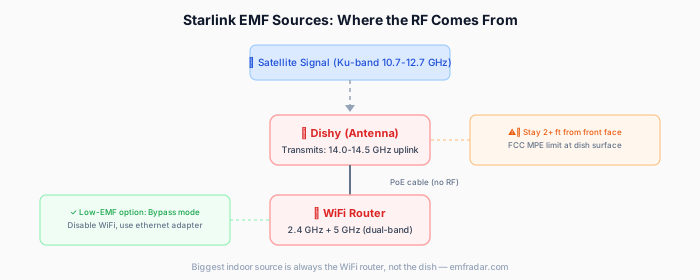
1. The Dish (Dishy McFlatface)
The Starlink dish is a phased-array antenna that communicates with satellites in the Ku-band (10.7–12.7 GHz downlink, 14.0–14.5 GHz uplink) and Ka-band (17.8–18.6 GHz downlink, 27.5–30.0 GHz uplink).
Key specs:
- Transmit power: Up to 4 watts EIRP (effective isotropic radiated power)
- Beam direction: Pointed at the sky (15–90° elevation)
- Frequency: 14–30 GHz (much higher than cell towers or WiFi)
- Beam type: Electronically steered phased array — focuses energy in a narrow cone toward the satellite
What this means for exposure: The dish points upward, not toward you or your neighbors. Its energy is concentrated in a narrow beam aimed at a satellite hundreds of kilometers overhead. At ground level, even directly under the dish, the RF levels are a small fraction of the main beam power.
FCC compliance testing for the Starlink dish (FCC ID: 2AWHPR201 and variants) showed:
- At 1 meter from the dish (directly in front): RF power density was well within FCC limits
- At the required exclusion zone distance (typically 0.6–2 meters depending on variant): Exposure at or below FCC limits for general population
- Behind and below the dish: Negligible RF — the dish is directional
Practical rule: If the dish is mounted on your roof and you’re inside the house, the roof, walls, and the fact that the beam points skyward mean your exposure from the dish is effectively zero in normal use.
2. The Starlink WiFi Router
The Starlink router (Gen 2 or Gen 3) is a standard WiFi 6 (802.11ax) or WiFi 6E router operating at:
- 2.4 GHz band
- 5 GHz band
- 6 GHz band (Gen 3 with WiFi 6E)
This is the component that actually produces most of your indoor RF exposure from the Starlink system. And it’s essentially identical to any other WiFi router — the RF characteristics are the same whether your internet comes from Starlink, fiber, cable, or DSL.
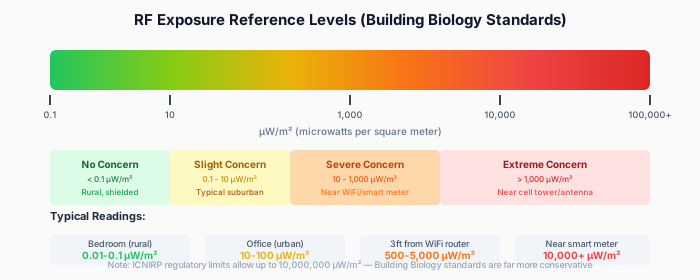
Typical measurements: | Distance from Router | RF Power Density | |———————|—————–| | 30 cm (1 foot) | 5–40 µW/cm² | | 1 meter (3.3 feet) | 0.5–5 µW/cm² | | 3 meters (10 feet) | 0.05–0.5 µW/cm² | | 5 meters (16 feet) | 0.01–0.1 µW/cm² |
These numbers are the same for a Starlink router, Netgear, TP-Link, or any other WiFi 6 router. The internet source doesn’t change the WiFi output.
3. The Satellites Themselves
Starlink’s constellation (5,000+ satellites in low Earth orbit at ~550 km altitude) beams signals to individual dishes. Some people worry about ambient RF from the satellites affecting everyone below.
The math is reassuring:
- Satellite transmit power: ~4,000 watts total across all beams
- Altitude: 550 km
- By the time those signals reach ground level, the power density is approximately 0.000001–0.00001 µW/cm²
For comparison, cosmic microwave background radiation (the leftover glow from the Big Bang) produces higher power density at Earth’s surface than Starlink satellites.
The satellite signal is designed for dishes, not humans. The Ku/Ka-band frequencies are absorbed by water and attenuated by atmosphere. The signal your dish receives is already incredibly weak — that’s why the dish has sophisticated electronics to pick it out of the noise.
Measured Starlink EMF: Real-World Data
Several independent researchers and EMF consultants have measured Starlink installations:
Study 1: Building biology assessment (2024)
An EMF consultant measured a residential Starlink installation with an RF meter:
- At the dish (1m, below): 0.002–0.01 µW/cm²
- At the dish (1m, in front/beam path): 0.1–0.5 µW/cm²
- Inside the house (dish on roof): 0.0001–0.001 µW/cm² from the dish (indistinguishable from background)
- 1m from Starlink router: 2–15 µW/cm² (typical WiFi router levels)
- Bedroom, 5m from router: 0.05–0.2 µW/cm² (again, standard WiFi levels)
Conclusion: 99%+ of indoor RF from a Starlink system comes from the WiFi router, not the dish or satellites.
Study 2: Comparison testing (2023)
A researcher compared total household RF levels before and after switching from cable internet + third-party router to Starlink:
- Before (cable + TP-Link router): Average living room RF: 0.3 µW/cm²
- After (Starlink dish + Starlink router): Average living room RF: 0.4 µW/cm²
- Difference: Negligible — within measurement variation
The slight increase was attributed to the Starlink router’s WiFi 6 having slightly different duty cycle characteristics, not the dish.
Check your EMF exposure
See cell towers, power lines, and substations near any US address.
Search Your AddressHow Starlink Compares to Other Internet Sources
| Internet Source | Indoor RF Contribution | Notes |
|---|---|---|
| Fiber (with WiFi router) | WiFi router only | Lowest — no outdoor RF component |
| Cable (with WiFi router) | WiFi router only | Same as fiber for RF purposes |
| DSL (with WiFi router) | WiFi router only | Same as fiber/cable |
| Starlink | WiFi router + trivial dish contribution | Dish adds negligible indoor RF |
| 5G Fixed Wireless (T-Mobile, Verizon) | WiFi router + gateway radio | Gateway receives 5G signal, re-broadcasts as WiFi |
| Cell phone hotspot | Phone RF | Higher than dedicated router at close range |
Bottom line: Starlink’s indoor RF profile is essentially identical to any other broadband connection with a WiFi router. The dish adds near-zero RF indoors.
Starlink vs. Cell Towers: Which Produces More RF at Your Home?

If you’re considering Starlink partly because you want to reduce your dependence on cell towers, here’s the comparison:
Cell tower (macro, 200m away):
- Outdoor RF at your home: 0.01–0.5 µW/cm²
- Indoor RF contribution: 0.001–0.1 µW/cm² (after building attenuation)
- Continuous, 24/7, not under your control
Starlink dish (on your roof):
- Indoor RF contribution: 0.0001–0.001 µW/cm²
- Beam points skyward, not into your home
- Under your control (can power down)
Either way, your WiFi router dominates indoor RF — typically 10–100x more than either cell towers or the Starlink dish at typical living distances.
Reducing RF from Your Starlink Setup

If you want to minimize your RF exposure from a Starlink system, focus on the router — that’s where the RF is. The same principles from reducing EMF exposure at home apply:

1. Use ethernet whenever possible
The Starlink router (Gen 2+) has an ethernet port. Gen 3 includes one directly; Gen 2 requires the ethernet adapter ($25).
- Wire your desktop computer, smart TV, and gaming console
- Use ethernet for any stationary device
- This reduces WiFi traffic (and thus RF output) since WiFi routers reduce transmit power when there’s less traffic
2. Router placement
- Place the Starlink router in a central location away from where you sleep and work
- Avoid putting it on your desk, nightstand, or within arm’s reach of where you sit for hours
- A good target: at least 3 meters (10 feet) from where you spend the most time
3. Disable WiFi bands you don’t use
If you connect most devices via ethernet, you may be able to reduce WiFi output. In the Starlink app:
- You can’t fully disable WiFi on the built-in router
- But you can use the Starlink router in bypass mode and connect your own router that allows disabling individual bands
- Or use an ethernet-only setup with a managed switch and no WiFi at all
4. Bypass mode + wired access points
For maximum control:
- Put the Starlink router in bypass mode (ethernet only, WiFi disabled)
- Connect a managed switch
- Use wired connections for everything possible
- If you need WiFi for phones/tablets, add a low-power access point in a convenient but non-bedroom location
- Set the access point on a timer to turn off at night
5. Dish placement considerations
While the dish contributes minimal RF indoors:
- Mount it on the roof, not on a ground-level tripod right outside a window
- The FCC recommends maintaining at least 0.6–2 meters from the dish face during operation
- Don’t stand in front of the dish while it’s operating (the beam is focused upward, but direct frontal exposure at close range can approach limits)
Common Concerns Addressed
“The dish is always transmitting — doesn’t that add up?”
Yes, the dish transmits data to the satellite continuously while in use. But the signal goes up, and the power levels at ground level are negligible. Standing directly below an operating Starlink dish, you’d receive less RF than from a WiFi router across the room.
“What about 5,000+ satellites overhead?”
The cumulative RF from all Starlink satellites at ground level is measured in nanowatts per square centimeter — millions of times below any safety limit and far below natural background RF from the sun and cosmos. Astronomers have legitimate concerns about light pollution from satellite constellations, but RF exposure at ground level is not one of them.
“I’ve heard the Ku/Ka-band frequencies are more dangerous”
Higher frequencies (like the 14–30 GHz range Starlink uses) are actually absorbed more readily by skin and penetrate less deeply into tissue than lower frequencies (like the 700 MHz–2.5 GHz range used by cell towers). This is why the FCC uses different exposure limits for different frequencies — and why Starlink’s dish, despite operating at higher frequencies, has similar or smaller exclusion zones than some lower-frequency cellular installations.
“My neighbor installed Starlink — am I exposed?”
Your neighbor’s Starlink dish points at the sky, not at your house. At your property, the RF from their dish would be orders of magnitude below measurable levels with consumer equipment. Their WiFi router might technically reach your home (just like any neighbor’s WiFi), but at typical house-to-house distances, this is negligible.
“I’m sensitive to EMF — should I avoid Starlink?”
If you experience symptoms you attribute to electromagnetic fields, the relevant factor with Starlink is the WiFi router — which is identical to any other router. If you currently use wired internet with no WiFi router, switching to Starlink with WiFi enabled would introduce new indoor RF. But if you already have a WiFi router, switching your internet SOURCE to Starlink doesn’t meaningfully change your indoor RF environment.
For maximum sensitivity: use Starlink in bypass mode with ethernet-only connections. This gives you satellite internet with zero indoor RF.
Starlink and 5G: Different Technologies, Different Concerns
People sometimes confuse Starlink with 5G, since both are new wireless technologies. For a thorough look at 5G safety, see our guide on whether 5G is safe. They’re fundamentally different:
| Feature | Starlink | 5G Cellular |
|---|---|---|
| Signal source | Satellite (550 km altitude) | Towers/small cells (nearby) |
| Your equipment | Dish (outdoor) + router (indoor) | Phone/gateway (indoor, near body) |
| Frequency | 14–30 GHz (dish to satellite) | 600 MHz–39 GHz (varies by band) |
| Indoor RF source | WiFi router only | Phone/gateway RF + external tower |
| Your control | Full (you own the equipment) | Limited (towers are public infrastructure) |
If you’re choosing between 5G fixed wireless (like T-Mobile Home Internet) and Starlink for home internet, the RF profiles are roughly similar — both use a WiFi router indoors. The 5G gateway additionally receives cellular signal, while the Starlink dish communicates via satellite. In practice, indoor RF levels are comparable.
Setting Up Starlink with Minimal EMF
If you’re installing Starlink and want to minimize RF from the start:
Optimal low-EMF setup:
- Mount dish on roof — maximum distance from living spaces
- Run ethernet from dish to a switch (use bypass mode on Starlink router, or order the ethernet adapter)
- Wire all stationary devices — computers, TVs, game consoles, streaming devices
- Add a low-power WiFi AP if needed for phones/tablets
- Place AP centrally but away from bedrooms
- Timer on AP — turn off WiFi overnight if you don’t need it
Cost of this setup:
- Starlink ethernet adapter: $25 (if Gen 2)
- Gigabit switch: $15–30
- Ethernet cables: $10–30
- Low-power access point (optional): $30–80
- Smart plug timer (optional): $10–15
- Total: $60–180 beyond basic Starlink kit
This gives you high-speed satellite internet with near-zero indoor RF.
Should You Be Concerned About Starlink EMF?
Based on measured data:
No, the Starlink system itself (dish + satellites) adds negligible RF to your indoor environment. The dish points skyward, operates at frequencies that don’t penetrate buildings well, and produces ground-level RF far below any safety limit.
The WiFi router is what matters — and it’s the same as any other WiFi router. If you’re comfortable with your current WiFi setup, Starlink doesn’t change the equation. If you want to reduce WiFi RF, the strategies are the same regardless of your internet source: use ethernet, manage router placement, and control when WiFi is active.
For the EMF-conscious: Starlink is actually one of the better options for low-EMF home internet because you can easily set it up in ethernet-only bypass mode, eliminating indoor RF entirely while still getting broadband speeds. Try that with a cellular hotspot.
Want to check what cell tower and RF sources are already near your home? Search your address on EMF Radar — it maps towers and estimates your existing exposure level in seconds.
Related Articles
- WiFi Router Placement: Safe Distance and Best Practices
- What Is a Safe Distance to Live From a Cell Tower?
- How to Measure EMF in Your Home: A Complete Guide
- How to Reduce EMF Exposure at Home: A Practical Guide
Related Reading
- EMF Radiation from Neighbor’s WiFi: Should You Be Concerned?
- EMF in the Office: Workplace Exposure Guide
- How Far Should Your WiFi Router Be? Safe Distance Guide
- EMF Exposure in Schools: WiFi and Cell Tower Risks
Concerned about EMF in your environment? Check your address on EMF Radar to see nearby cell towers and power lines, or find a certified EMF consultant for professional testing.